Build an automated system that generates unique nature scenes, pairs them with a meaningful quote, formats everything for social, and delivers the final file with caption and hashtags — all on autopilot.
Check out the TikTok page where videos are posted. Be sure to to like an follow.
A simple “nature video” prompt tends to generate nearly identical scenes on every run.
Quotes are even more repetitive, often defaulting to the same “journey of a thousand miles begins with a single step”-style messages.
AI-generated videos still frequently include misspelled on-screen text.

First, a static script selects from a large pool of variables: time of day, season, landscape features, and overall mood.
The same logic applies to quotes: it chooses from different message types that align with the selected scene.
This creates hundreds of unique combinations before AI is even involved.
Adding AI-optimized prompt generator
Those variables are then passed into an AI prompt generator that follows best practices for writing strong video prompts.
The result is a detailed, high-quality prompt tailored to each unique scene and quote style.
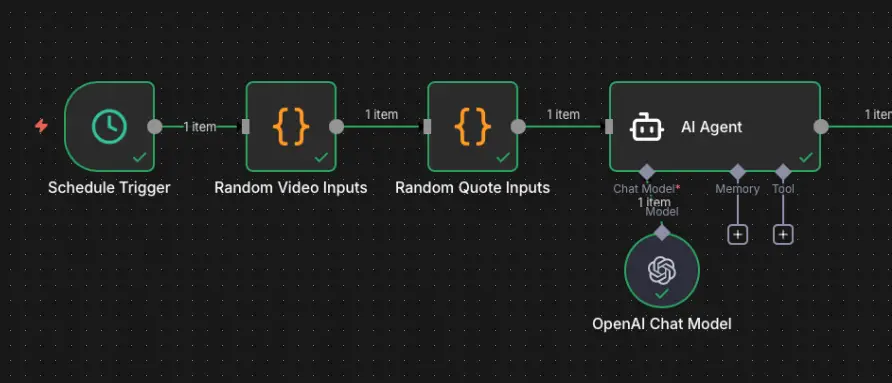
The AI prompt generator produces three outputs:
A video prompt (explicitly excluding the quote text).
The quote itself.
A caption and hashtags optimized for posting.
The video prompt is sent to kie.ai, which uses Sora 2 to generate the clip. Cost is roughly $0.15 per 10-second video, making it affordable to run at scale.
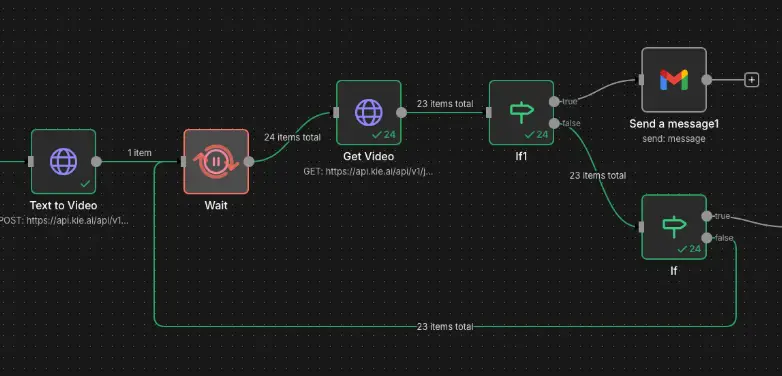
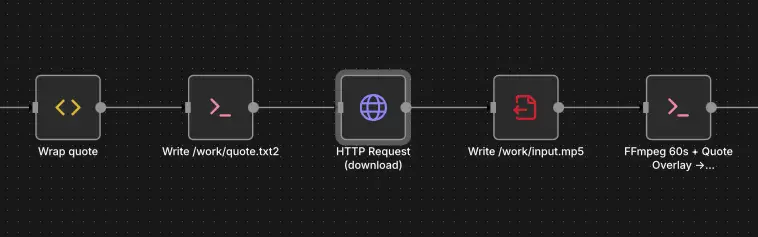
Once rendering is complete, the video is downloaded to the server for processing. The workflow stitches together 7 copies of the clip with subtle transitions between each, bringing the total runtime to just over 1 minute.
The quote is then overlaid onto the video. Because the quote is generated as plain text (not baked into the video by the AI model), we avoid the common problem of misspelled words in the visuals.
There is a version of the workflow that stitches together the last 7 generated videos, rather than repeating the same one, to create a highlight-style compilation.
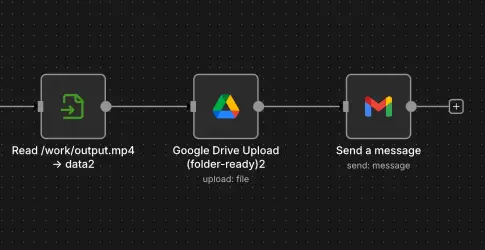
The finished video is uploaded to Google Drive, and an email notification is sent when processing is complete.
The email includes:
A direct link to the video
The caption and hashtags for quick posting
Note: Platforms like TikTok and Instagram do not currently offer public APIs for end users to auto-upload content directly, but some third-party tools provide posting integrations that can be layered on top of this workflow.